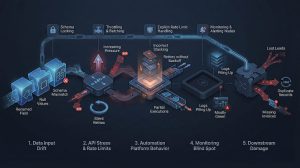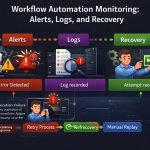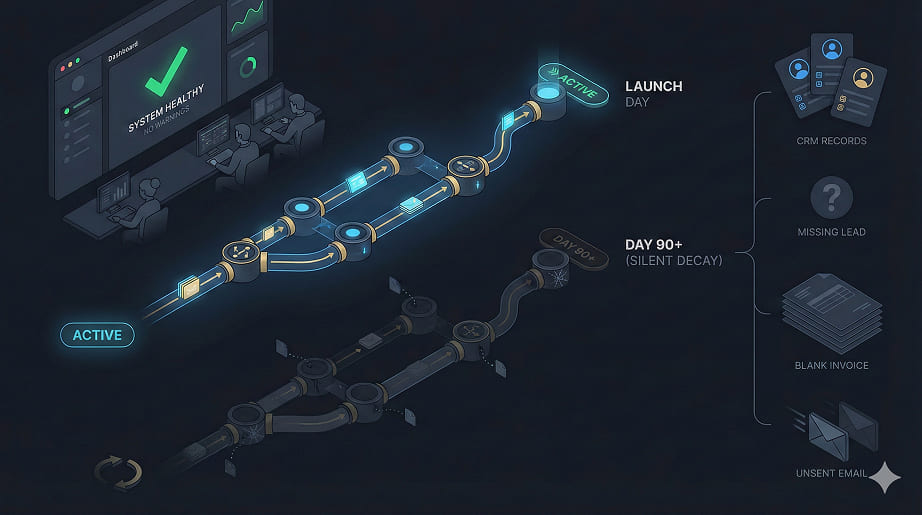
Workflow automation rarely fails during setup.
It fails quietly after launch — when nobody is watching.
Most teams assume automation is a “set and forget” system. It isn’t. The moment a workflow goes live, it enters a hostile environment: changing APIs, human behavior, incomplete data, rate limits, and silent system conflicts.
The dangerous part?
Failures don’t announce themselves. They accumulate unnoticed until damage appears somewhere else — lost leads, broken CRM data, duplicate entries, missing invoices, untriggered emails.
Automation doesn’t explode.
It rots.
This article breaks down exactly why automations collapse after deployment, where they silently break, and how to build workflows that survive real-world conditions.

The Illusion of “It’s Working”
When teams launch a workflow, they check one thing:
✔ Trigger fires
✔ Action runs
✔ Looks good
Then they walk away.
But automation is not a single event.
It’s an ongoing chain that depends on:
-
Consistent data structure
-
API reliability
-
Tool uptime
-
User behavior
-
Volume scaling
-
Ownership & monitoring
Without control over those variables, automation drifts toward failure.
1. No One Owns the Workflow
Biggest hidden killer.
Once automation is built:
-
Marketing thinks tech owns it
-
Tech thinks marketing owns it
-
Ops assumes it’s self-running
Result:
No alerts, no audits, no logs reviewed.
Workflows die because responsibility dies first.
Fix:
Assign explicit ownership. Every automation must have:
-
One accountable owner
-
Weekly check responsibility
-
Failure escalation rule
Automation without an owner = abandoned infrastructure.
This is one of the most common failures in poorly designed lead automation systems.
2. Input Data Slowly Changes
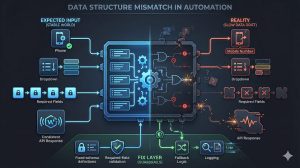
Automation relies on predictable data especially in connected tools and multi-step workflow automation systems.
But in reality:
-
Form fields get renamed
-
CRM properties change
-
Optional fields become empty
-
APIs return new structures
Your workflow doesn’t adapt. It just starts misfiring.
Common examples:
-
“Phone” becomes “Mobile Number”
-
Dropdown values modified
-
Null values break conditional logic
Automation doesnt break loudly. It breaks silently.
Fix:
-
Lock data structure
-
Validate required fields
-
Use fallback logic
-
Log missing inputs
3. API Limits Start Blocking You (Without Warning)
Early stage = low volume → everything works.
Growth stage = higher requests → 429 errors begin.
Most no-code tools:
particularly tools like Zapier, Make, and other automation platforms.
-
Retry blindly
-
Queue incorrectly
-
Drop executions
You think leads are syncing. They aren’t.
Fix:
-
Add throttling
-
Control batch size
-
Monitor API response codes
-
Design for rate-limit handling
Automation must scale before traffic scales.
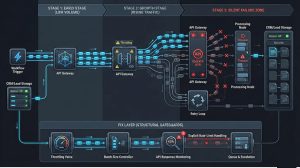
4. Partial Failures Go Undetected
Worst type of failure:
Some steps run. Others don’t.
Example:
Lead captured → CRM created → Email step fails.
Now your system looks “fine” but revenue leaks.
This is a silent killer in sales and lead routing workflows.
Tools rarely notify partial errors unless manually configured.
Fix:
-
Add failure notifications
-
Track completion status
-
Build checkpoint steps
-
Store workflow state
5. Dependencies Change (Plugins, Tools, Updates)
Every automation relies on external systems:
including CRMs, webhooks, and third-party integrations.
-
Plugins update
-
APIs version change
-
Auth tokens expire
-
Permissions break
Your workflow logic stays the same, but the environment doesn’t.
Fix:
-
Quarterly workflow audit
-
Token renewal tracking
-
Tool dependency list
-
Change log monitoring
6. No Monitoring = No Visibility
Teams track setup, not performance.
This is where most workflow automation setups collapse.
You should be tracking:
-
Failed executions
-
Delay time
-
Drop rate
-
API errors
-
Volume spikes
Without monitoring, workflows decay unnoticed.
Fix:
Create automation monitoring layer:
-
Alerts on failure
-
Log review
-
Weekly health checks
-
Test triggers monthly
Automation without monitoring is blind.

7. Edge Cases Multiply Over Time
At launch:
You test ideal scenarios.
In production:
-
Users submit wrong formats
-
Empty fields appear
-
Unexpected behavior occurs
-
Duplicate triggers fire
Edge cases grow. Your automation logic stays static.
Fix:
-
Add validation rules
-
Conditional error paths
-
Duplicate protection
-
Exception handling
The Hard Truth About Automation
Automation isn’t software.
It’s a live operational system.
If you don’t:
-
Monitor it
-
Maintain it
-
Own it
-
Adapt it
It will fail — just slowly and invisibly.
The companies that succeed with automation treat workflows like infrastructure, not shortcuts.
The same discipline used to build reliable software must be applied to automation architecture.