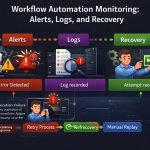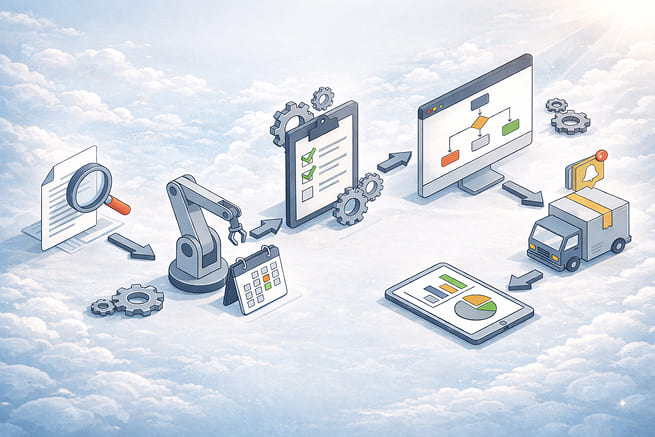
(Real Systems, Real Failures, Real Architecture)
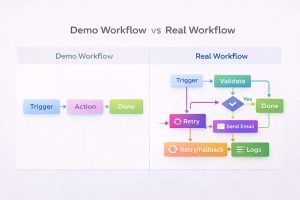
Thank you for reading this post, don't forget to subscribe!Most workflow automation examples you see online are demos, not systems.
They show a trigger, a few actions, and a clean success path — but they never show what happens when data is missing, APIs fail, ownership is unclear, or workflows need to run at scale.
That’s why businesses think automation “doesn’t work,” when in reality they automated the wrong way.
This guide breaks down real workflow automation examples, explains where they fail in production, and shows how reliable workflows are actually designed — not how tools market them.
Why Most Workflow Automation Examples Are Useless
Most examples exist to sell tools, not to teach systems.
They usually:
-
Ignore failure paths
-
Assume perfect data
-
Skip ownership and monitoring
-
Collapse under real usage
A Zap that works for 10 leads will fail at 1,000.
A demo that works for one team breaks across departments.
Automation doesn’t fail randomly.
It fails predictably, when architecture is shallow.
This is why you should never copy “example workflows” blindly. They are patterns — not production systems.
What a Real Workflow Automation System Looks Like
A real workflow is not “trigger → action.”
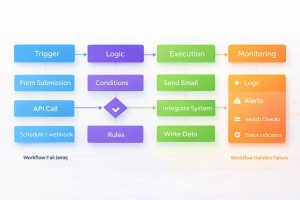
A real workflow has:
-
Triggers (explicit, verifiable events)
-
Logic (validation, branching, conditions)
-
Execution layers (tools or native integrations)
-
State management (what has already happened)
-
Failure handling (retries, fallbacks)
-
Monitoring & ownership (alerts + accountability)
If any of these are missing, the workflow is fragile.
This is why workflow automation must be treated as a system, not a shortcut.
Real Workflow Automation Examples (No Toy Demos)
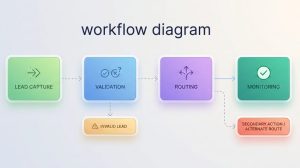
1. Lead Routing Workflow (Agencies & Sales Teams)
Goal:
Route incoming leads to the right owner instantly.
What breaks in reality:
-
Duplicate leads
-
Missing fields
-
CRM sync delays
-
Ownership conflicts
Why basic automations fail:
Most examples route leads immediately without validation. When data is incomplete or duplicated, leads are misassigned or dropped silently.
Correct architecture:
-
Validate lead data first
-
Deduplicate before routing
-
Assign ownership explicitly
-
Log every assignment
-
Alert on failures
This use case fits squarely within Lead Automation, where routing logic, ownership rules, and response timing directly impact revenue.
2. CRM Synchronization Workflow
Goal:
Keep marketing, sales, and support data in sync.
What breaks in reality:
-
Conflicting updates
-
Partial syncs
-
API rate limits
-
Data drift over time
Why basic automations fail:
Most examples assume bidirectional sync is safe. It’s not. Race conditions and overwrites are common.
Correct architecture:
-
Define a single system of record
-
Sync one direction where possible
-
Normalize data before updates
-
Log and audit changes weekly
Most of these failures happen at the integration layer, where APIs and webhooks silently break.
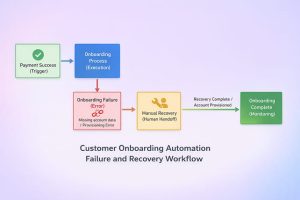
3. Customer Onboarding Automation
Goal:
Start onboarding after signup or payment.
What breaks in reality:
-
Payment success but onboarding failure
-
Missing account data
-
No human handoff
Why basic automations fail:
They treat onboarding as a single workflow instead of multiple dependent workflows.
Correct architecture:
-
Separate payment confirmation from onboarding execution
-
Validate account state before provisioning
-
Add manual recovery paths
-
Monitor completion, not just triggers
4. Internal Ops Approval Workflow
Goal:
Automate approvals for finance, HR, or operations.
What breaks in reality:
-
Email-based approvals lost
-
No audit trail
-
No escalation logic
Why basic automations fail:
They rely on inboxes instead of stateful systems.
Correct architecture:
-
Store approval state centrally
-
Escalate based on status, not time alone
-
Log every decision
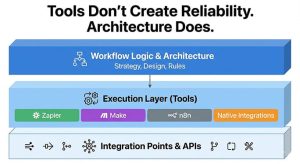
Tools Don’t Create Reliability. Architecture Does.
Zapier, Make, n8n, and native integrations are execution layers, not solutions.
-
Zapier is great for simple, low-risk workflows
-
Make handles complex branching better
-
n8n works when control and self-hosting matter
-
Native integrations are best when available
The mistake is choosing tools before designing workflows.
Choose tools after you know:
-
Volume
-
Failure tolerance
-
Monitoring needs
-
Ownership model
To compare platforms and execution tradeoffs, explore our Automation Tools and Integrations guides.
How to Decide What to Automate (And What Not To)
Automate only when:
-
The process is stable
-
Ownership is clear
-
Data is reliable
-
Failure impact is acceptable
Do not automate:
-
Unclear processes
-
Rapidly changing workflows
-
Anything you can’t monitor
Automation amplifies both efficiency and mistakes.
Final Rule: If You Can’t Monitor It, Don’t Automate It
Every workflow should answer:
-
Did it run?
-
Did it complete?
-
Where did it fail?
-
Who is responsible?
If you can’t answer those questions, automation is not saving you time — it’s hiding risk.
Final Takeaway
Real workflow automation isn’t about speed.
It’s about reliability, visibility, and control.
Examples that ignore failure are demos.
Systems that survive failure are automation done right.