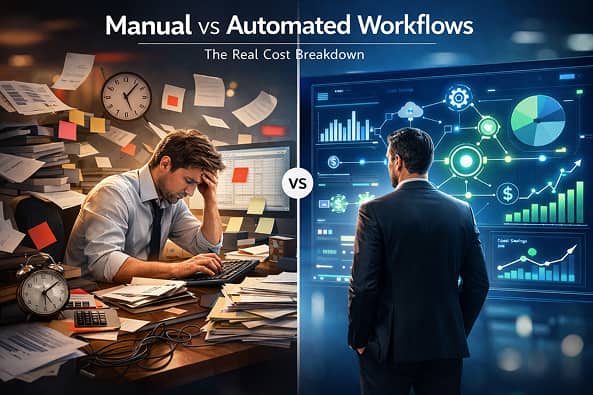
Introduction: The Hidden Cost Nobody Calculates
Most businesses believe manual workflows are cheaper.
Thank you for reading this post, don't forget to subscribe!They aren’t.
They feel cheap because:
-
No tools to pay for
-
No setup time upfront
-
No “automation complexity”
But manual workflows leak money slowly — through time loss, errors, missed follow-ups, and scale failure.
Automation, on the other hand, looks expensive at the start:
-
Tools
-
Setup
-
Learning curve
So teams delay it.
This article breaks down manual vs automated workflows using real operational costs, not opinions — and shows when automation actually becomes cheaper, safer, and more profitable.
What a Manual Workflow Really Looks Like (In Practice)
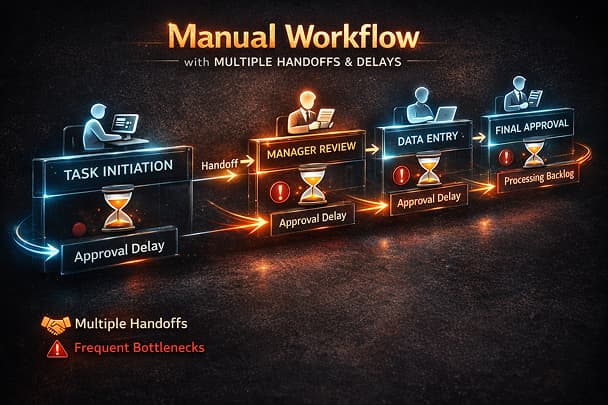
Manual workflows depend on humans executing steps consistently.
Example:
-
Lead arrives
-
Someone checks inbox
-
Copies data
-
Pastes into CRM
-
Assigns to sales
-
Sends follow-up
Nothing here sounds expensive — until you add volume.
Manual workflows rely on:
-
Memory
-
Attention
-
Availability
-
Good intent
They break at handoffs, not tools.
What an Automated Workflow Actually Is
An automated workflow replaces repeated decision-making with rules.
Same example, automated:
-
Lead arrives
-
Workflow validates data
-
Deduplicates
-
Routes to CRM
-
Assigns owner
-
Triggers follow-up
-
Logs success or failure
Automation doesn’t remove responsibility.
It moves responsibility into system design.
This is the foundation of Workflow Automation, where reliability matters more than speed.
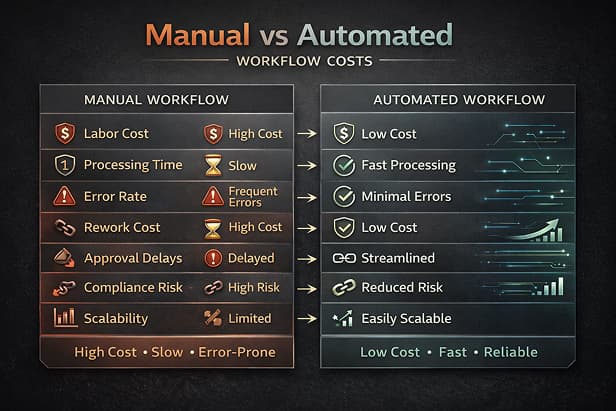
Cost Breakdown: Manual vs Automated (Real Numbers)
Let’s compare monthly costs for a business handling 1,000 leads/month.
Manual Workflow Costs
| Cost Factor | Monthly Cost |
|---|---|
| 1 ops staff (₹40,000 / $500) | ₹40,000 |
| Rework due to errors (10–15%) | ₹6,000 |
| Missed or delayed leads | ₹10,000+ |
| Manager oversight time | ₹5,000 |
Total manual cost:
👉 ₹61,000+ per month
And this assumes:
-
No sick days
-
No turnover
-
No growth
Automated Workflow Costs
| Cost Factor | Monthly Cost |
|---|---|
| Automation tool | ₹2,000–₹4,000 |
| Initial setup (amortized) | ₹3,000 |
| Monitoring & maintenance | ₹2,000 |
Total automated cost:
👉 ₹7,000–₹9,000 per month
Automation becomes cheaper before 500–700 executions/month in most businesses.
The Scaling Problem Manual Workflows Can’t Solve
Manual workflows scale linearly.
More volume = more people.
Automation scales exponentially:
-
Same workflow
-
Same logic
-
More executions
This is where Lead Automation becomes critical — routing, deduplication, and response time directly affect revenue.
Error Rate: The Silent Killer of Manual Workflows
Manual systems fail quietly:
-
Wrong field copied
-
Lead assigned late
-
Follow-up forgotten
-
Duplicate records created
Automation fails loudly if designed correctly.
This is why Workflow Automation Monitoring exists — logs, alerts, and recovery are mandatory.
When Manual Workflows Still Make Sense
Be honest — automation is not always the answer.
Manual workflows are acceptable when:
-
Volume is extremely low
-
Process is temporary
-
Steps change daily
-
Risk is near zero
If the process touches:
-
Revenue
-
Customers
-
Payments
-
Leads
Manual is already too risky.
When Automation Becomes Non-Negotiable
You must automate when:
-
Volume exceeds human attention
-
Delays cost money
-
Errors affect trust
-
Data moves between tools
This is where Automation Tools and Integrations matter — not as features, but as execution layers.
The Real Risk of “Partial Automation”
The worst setup is:
-
Half manual
-
Half automated
-
No monitoring
Example:
-
Automated lead capture
-
Manual CRM entry review
-
No failure alerts
This creates blind spots — the most dangerous failure mode.
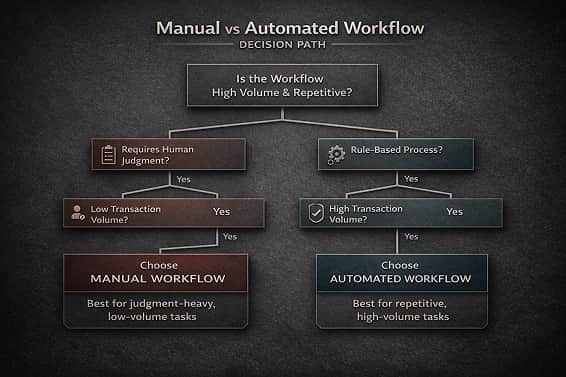
Decision Framework: Should You Automate This?
Ask these 5 questions:
-
Does this process repeat weekly?
-
Does it involve data movement?
-
Can mistakes cause loss?
-
Does volume fluctuate?
-
Would failure go unnoticed?
If you answer yes to 3 or more, automation is cheaper — even if tools cost money.
Final Verdict: Automation Isn’t Expensive — Neglect Is
Manual workflows feel cheap because the bill arrives slowly.
Automation feels expensive because the bill arrives upfront.
But over time:
-
Manual costs compound
-
Automation stabilizes
-
Errors decrease
-
Trust increases
The question isn’t manual vs automated.
The real question is:
How much money are you losing because your workflow depends on memory instead of systems?