Lead automation is where most businesses lose money without realizing it.
Thank you for reading this post, don't forget to subscribe!Forms get submissions. Ads keep running. CRMs look active.
But somewhere between the form and the CRM, leads quietly disappear, duplicate, or arrive incomplete.
This isn’t a tool problem.
It’s a workflow design problem.
In this guide, you’ll learn What a Lead Automation Workflow Really Is, where they break in real systems, and how to design a lead pipeline that moves data from form to CRM without loss, duplication, or silent failure.
What a Lead Automation Workflow Really Is
A lead automation workflow is not a single integration.
It’s a multi-step system that includes:
-
A trigger (form, ad, chat, landing page)
-
Data transport (webhook or API)
-
Processing logic (filters, validation, routing)
-
A destination (CRM, spreadsheet, sales tool)
-
Follow-up actions (email, alerts, assignments)
If any one of these steps fails, the lead is either lost or corrupted.
It’s a multi-step system that includes…
The Real Lead Automation Flow (Not Tool Demos)
Most businesses follow this flow:
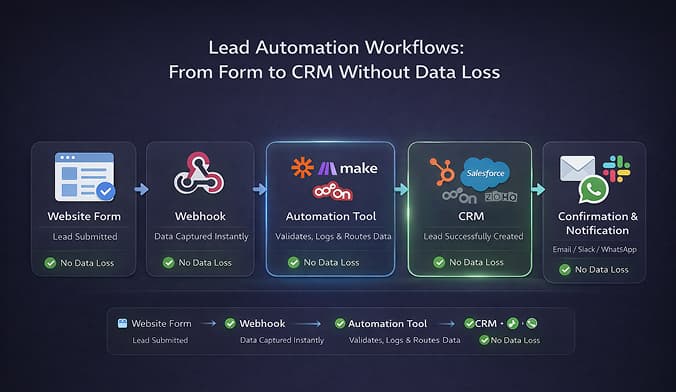
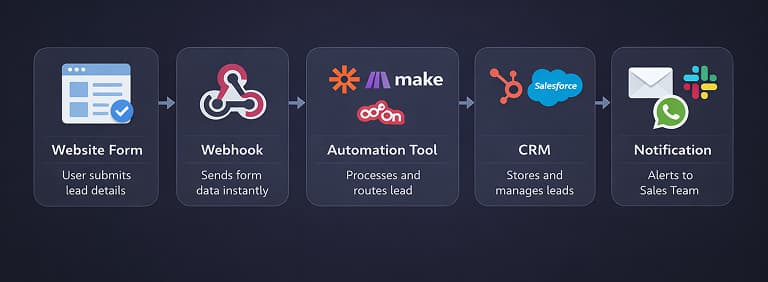
Form submission → Webhook fires → Automation tool receives data → CRM creates lead → Notification sent
This looks simple.
It isn’t.
Each arrow hides failure points:
-
Webhook delivery issues
-
Field mismatches
-
Rate limits
-
Duplicate triggers
-
CRM validation errors
Where Lead Automation Breaks in Production
1. Form Data Is Incomplete or Dirty
Real users submit:
-
Empty optional fields
-
Invalid phone numbers
-
Unexpected formats
Automation tools don’t “fix” this — they pass it forward.
Result:
CRM rejects the lead or stores broken data.
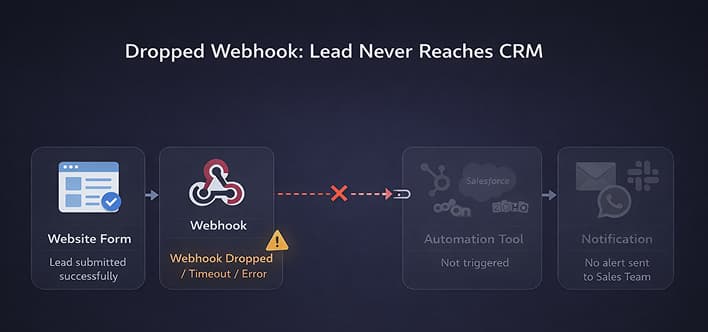
2. Webhooks Fail Silently
Webhooks don’t retry forever.
If:
-
Endpoint times out
-
Server responds slowly
-
Authentication breaks
The lead never arrives.
No alert. No retry. No warning.
3. Duplicate Leads Flood the CRM
Duplicates happen when:
-
Users submit forms multiple times
-
Ads resend events
-
Webhooks retry incorrectly
This inflates lead counts and destroys sales trust.
Fixing duplicates after the fact is expensive.
4. CRM Rules Reject Leads
CRMs often enforce:
-
Required fields
-
Unique constraints
-
Validation rules
Automation tools may mark the workflow “successful” even when the CRM rejects the record.
Revenue leak confirmed.
Why Most Lead Automation Breaks After Launch
At launch:
-
Volume is low
-
Everything looks clean
-
Errors are rare
After growth:
-
Traffic spikes
-
APIs throttle
-
CRMs slow down
-
Edge cases explode
Lead automation must be designed for scale, not demos.
How to Build Lead Automation That Doesn’t Lose Data
1. Validate Before Sending
Before pushing data to CRM:
-
Check required fields
-
Normalize formats
-
Reject bad submissions early
Bad data should stop the workflow, not poison your CRM.
2. Add Deduplication Logic
Every workflow should:
-
Check email/phone existence
-
Update existing leads
-
Prevent blind creation
Duplicate protection is not optional.
3. Control Volume and Rate Limits
High traffic + no throttling = dropped leads.
You must:
-
Batch requests
-
Delay bursts
-
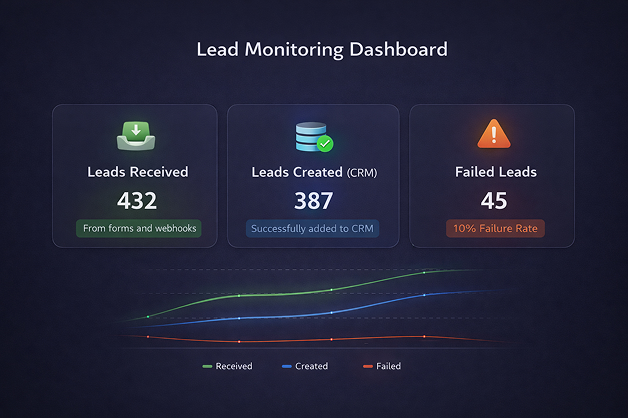
4. Monitor Every Lead Path
You must track:
-
Leads received
-
Leads created
-
Leads failed
-
Leads delayed
If these numbers don’t match, you have leakage.
5. Assign Ownership
Someone must own:
-
Workflow health
-
Weekly review
-
Failure alerts
Lead automation without ownership is abandoned infrastructure.
The Hard Truth About Lead Automation
Lead automation is not about speed.
It’s about trust.
Sales teams trust systems that:
-
Never drop leads
-
Never duplicate silently
-
Always report failures
If your automation can’t be trusted, it will be bypassed — and manual work will creep back in.